REA AI Reverse Engineering Tool: Claude Code, Cursor, Ghidra & IDA Pro


REA Connects Claude Code and Cursor to Ghidra and IDA Pro for AI Reverse Engineering
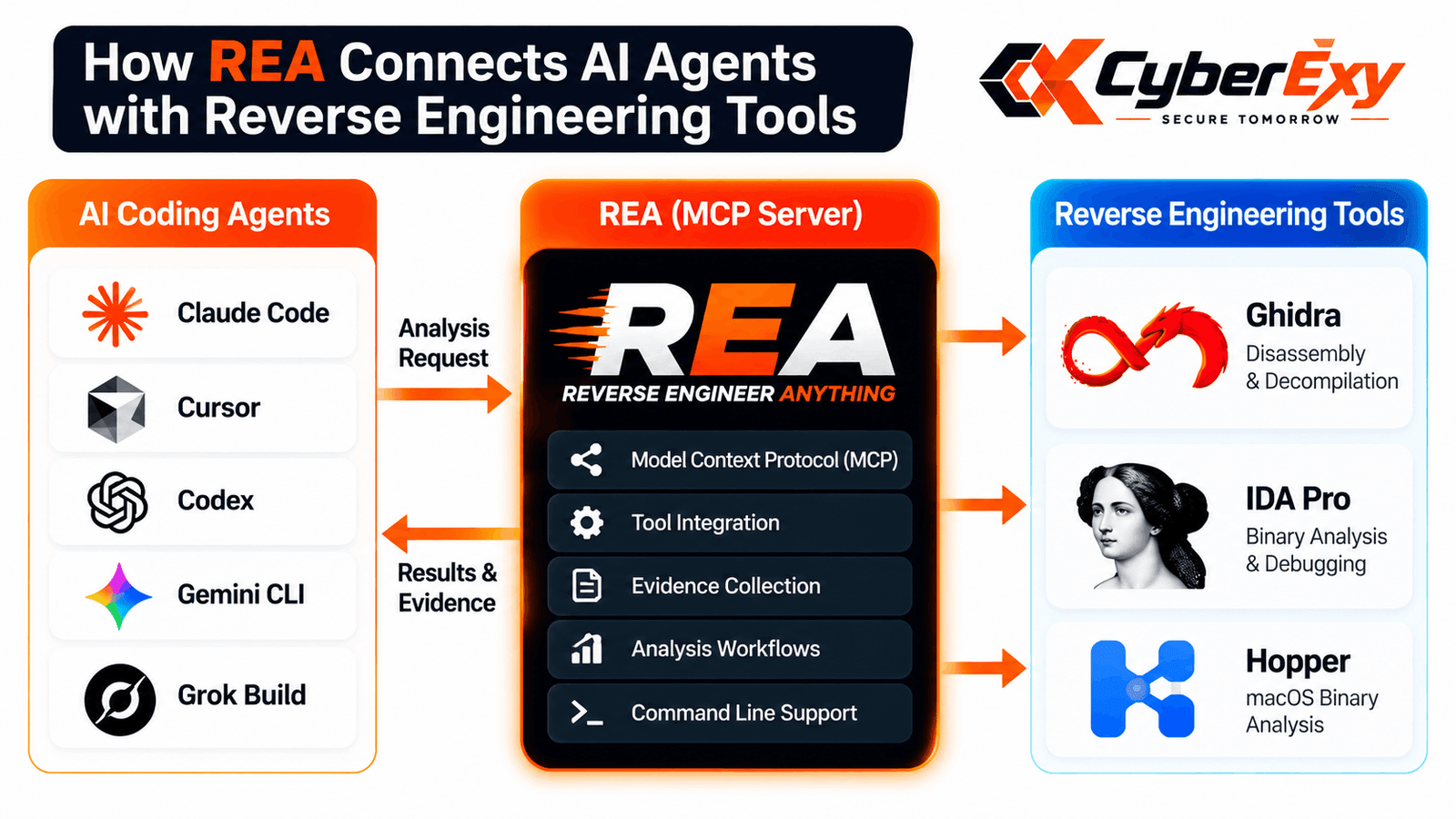
Artificial intelligence is transforming how developers and cybersecurity researchers investigate software. REA (Reverse Engineer Anything) is an open-source project that connects AI coding agents, including Claude Code and Cursor, with established reverse engineering tools such as Ghidra, IDA Pro, and Hopper.
The project helps researchers examine software without its original source code, investigate program behaviour, and trace code relationships through evidence-based workflows. By combining AI-assisted investigation with established analysis engines, REA aims to make software reverse engineering more accessible and efficient.
Its capabilities cover several software types, including native binaries, JavaScript applications, Electron software, .NET assemblies, Android packages, and other supported targets. However, available features depend on the selected analysis provider, platform, and target.
What Is REA (Reverse Engineer Anything)?
REA is an open-source reverse engineering project designed to connect compatible AI agents with software analysis tools. It uses the Model Context Protocol (MCP) to allow supported agents to request information from a local analysis server.
Traditional reverse engineering often requires analysts to move between disassemblers, decompilers, and debugging tools. They must identify functions, inspect assembly instructions, follow references, and interpret program structures manually.
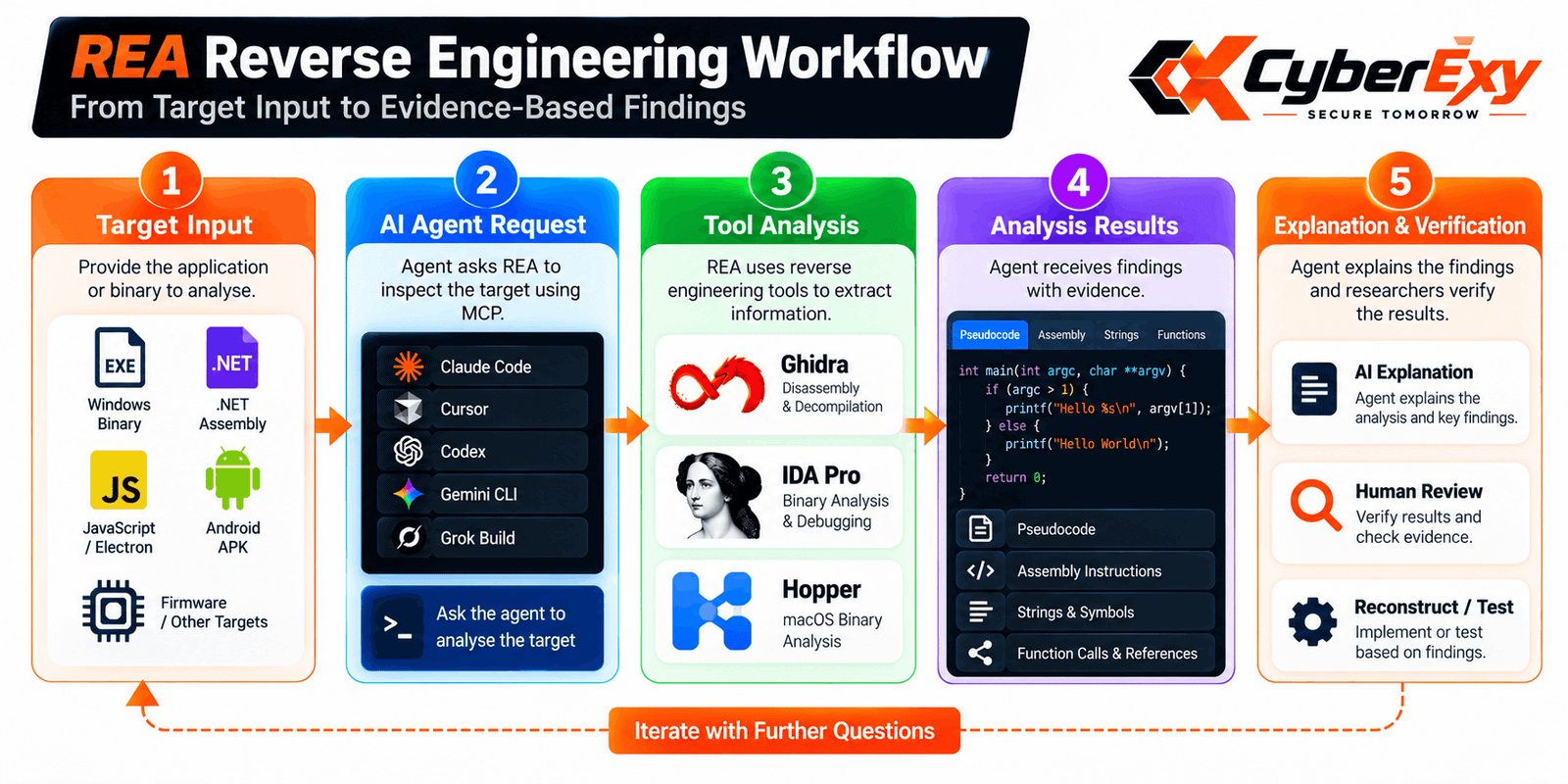
REA provides an agent-driven workflow for these activities. An AI agent can request relevant information, examine the returned results, and investigate related code paths to develop a better understanding of the target.
Importantly, REA does not replace Ghidra or IDA Pro. Instead, it connects an AI-assisted workflow to the capabilities of existing analysis tools.
Key Features of the REA AI Reverse Engineering Tool
1. Native Binary Analysis with Ghidra and IDA Pro
Native binary analysis is essential when investigating compiled applications without access to their original source code.
Through supported analysis providers, REA can help retrieve information such as:
- Decompiled pseudocode and assembly instructions
- Function names and available symbols
- Strings and cross-references
- Function calls and relationships
- Relevant program structures and data types
Researchers can use this information to trace how a particular feature operates or identify relationships between functions.
Native analysis requires a compatible analysis engine and appropriate configuration. Results may also be limited by stripped symbols, obfuscation, unsupported architectures, or incomplete information.
2. JavaScript and Electron Application Analysis
REA also supports workflows for examining JavaScript and Electron applications.
Depending on the target and supported features, analysis can reveal modules, imports, routes, source maps, and communication between application processes.
This can help researchers understand how a desktop application’s interface communicates with underlying processes or how different modules contribute to a particular function.
Static inspection can examine application files without launching the software. Runtime investigation is different because it may execute code and interact with the target environment.
3. .NET Assembly Inspection
Compiled .NET applications can also benefit from AI-assisted analysis.
Supported workflows can expose assembly metadata, Common Intermediate Language (CIL) instructions, and declared native dependencies. This information helps researchers understand program structure and investigate how different components interact.
These capabilities can support software maintenance, compatibility research, and authorised security assessments. They do not guarantee complete recovery of original source code, particularly when applications use obfuscation or other protective measures.
4. MCP and Command-Line Integration
REA combines MCP-based agent integration with command-line workflows. This allows compatible coding agents to request analysis during a development session while giving terminal-oriented users another way to interact with supported functionality.
The approach can reduce repetitive navigation between tools and help researchers organise investigations more efficiently.
Supported agent options and setup requirements may change, so users should consult the official project documentation before installation.
How to Install and Configure REA
Getting started involves preparing the required environment and configuring a compatible agent.
Step 1: Install Node.js and npm. Check the official repository for the currently supported Node.js version and system requirements.
Step 2: Run the setup command. Open a terminal and execute:
npx rea-agents setup
Step 3: Review configuration changes. Follow the prompts to select a supported agent and approve the configuration changes you intend to make.
Step 4: Configure the analysis provider. If you plan to analyse native binaries, ensure that a compatible installation of Ghidra, IDA Pro, or another supported engine is available.
Step 5: Restart your agent. Restart the selected application after configuration and verify that the integration is available.
Start with a test program that you own or are authorised to examine. For complete instructions and compatibility details, visit the official REA GitHub repository and REA website.
Real-World Examples of REA
The project’s published case studies demonstrate how evidence-based reconstruction can help researchers understand software behaviour.
One example involves DX-Ball, where the project reports reconstructing a sound-positioning calculation and validating the implementation against the original executable. Its published demonstration reports 3,205 passing tests and a match across 63 compiled function bytes.
Another example examines clipboard handling in Notion’s Electron application. The investigation follows communication between the renderer, preload layer, and main process to explain how the operation moves through application components.
These are project-reported demonstrations, not guarantees that every application can be reconstructed completely. Independent testing remains important for validating results.
Benefits of AI-Assisted Reverse Engineering
REA offers several potential advantages for cybersecurity researchers and developers:
- Less repetitive work: AI agents can help locate relevant functions and code relationships.
- Evidence-based investigation: Researchers can inspect retrieved information rather than relying exclusively on generated explanations.
- Flexible workflows: MCP and command-line access support different working preferences.
- Faster code exploration: Supported workflows can help trace dependencies across application components.
- Testable results: Reconstructed behaviour can be compared with the original program to identify differences.
However, AI-generated interpretations can still be incorrect. Human review, reliable evidence, and appropriate testing remain necessary.
Security and Privacy Considerations
Reverse engineering supports legitimate activities such as malware analysis, defensive security research, debugging, and software compatibility testing. Researchers should ensure they have appropriate authorisation to analyse their targets.
Although REA uses local analysis workflows, results provided to an AI agent may be subject to the relevant model provider’s data-handling policies. Local execution therefore does not automatically mean that all information remains on the local machine.
Researchers should review privacy settings before analysing proprietary code, confidential files, or sensitive investigation data. Suspicious applications should be handled in an appropriately isolated environment when runtime execution is necessary.
Conclusion
REA (Reverse Engineer Anything) connects AI coding agents such as Claude Code and Cursor with established reverse engineering tools, including Ghidra and IDA Pro. Its approach can help researchers inspect binaries, trace application behaviour, investigate dependencies, and validate reconstructed logic.
For cybersecurity professionals and software developers, REA offers an integrated approach to software investigation. Nevertheless, its effectiveness depends on target compatibility, available analysis tools, and the quality of verification.
Explore more cybersecurity insights on Cyberexy for articles about digital forensics, malware analysis, software security, and responsible security research.
Official resources: REA GitHub repository | REA documentation website