
Microsoft Teams Adds AI Phishing Detection for Chats in 2026

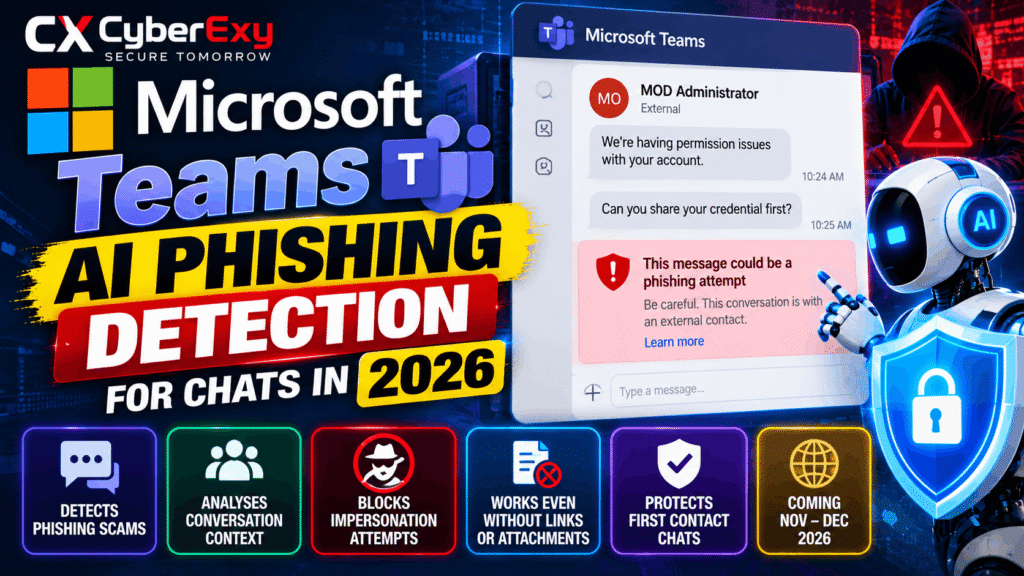
Microsoft Teams to Use AI to Detect Phishing Attacks Through Conversations in 2026
Microsoft Teams is preparing to introduce AI-powered phishing detection that analyzes conversation context to identify scams, impersonation attempts and social engineering attacks—even when messages contain no malicious links or attachments. The new security capability is designed to help users recognize suspicious requests from unfamiliar external contacts before they disclose credentials or other sensitive information.
Microsoft announced the change in Message Center notice MC1519866 on October 21, 2026. According to the announcement, the Targeted Release rollout is expected to begin in early November and finish by mid-November. Worldwide general availability is scheduled to begin in early December and finish by mid-December 2026.
The update adds another layer of protection to Microsoft Teams, where attackers may exploit users’ trust in apparent IT administrators, technical support representatives and other trusted contacts.
Source: Microsoft Teams phishing detection guidance
How Microsoft’s AI Phishing Detection Will Work
Traditional phishing defenses often focus on malicious URLs, suspicious attachments and known indicators of compromise. However, social engineering attacks can succeed without using any of these techniques.
An attacker might initiate a conversation, claim that an employee’s account has a problem, and request a password or verification code to supposedly resolve the issue. The message may look professional and contain no suspicious link or file.
Microsoft’s new capability uses AI-powered, context-aware detection to identify potentially deceptive behavior in conversations. The system is intended to recognize patterns associated with:
- Phishing and credential theft attempts.
- Impersonation of administrators or technical support staff.
- Social engineering and manipulative requests.
- Deceptive messages designed to obtain sensitive information.
- Suspicious interactions involving unfamiliar external contacts.
Instead of relying exclusively on technical indicators, the feature considers the context of a conversation to help identify potentially malicious intent.
This approach is particularly relevant to business communication platforms, where employees routinely interact with colleagues, contractors, suppliers and external partners.
Why External First-Contact Chats Are a Security Concern
Microsoft says the feature will primarily focus on first-contact conversations with external users. These interactions can present opportunities for attackers to establish trust before making a fraudulent request.
For example, an external account might use a display name resembling an IT administrator and claim that an employee must resolve an account permission issue. The attacker could then ask the employee to share credentials.
A warning in this situation can help the recipient reconsider the request before responding.
Microsoft’s example illustrates an external contact named “MOD Administrator” asking a user to provide credentials. Teams identifies the interaction as a potential phishing attempt, demonstrating how suspicious conversational intent can matter even when no harmful URL is present.
This threat pattern is consistent with previously reported attacks involving fake IT support representatives and social engineering through collaboration tools. Cybersecurity News has also reported on attackers impersonating IT help desk staff through Teams and fake support operators abusing Microsoft Teams.
The key lesson is that a familiar-looking name or professional message does not establish that a contact is legitimate.
Microsoft Teams AI Phishing Detection Rollout Timeline
Microsoft has outlined a phased rollout for the new capability.
| Rollout stage | Expected timeline |
|---|---|
| Microsoft Message Center announcement | October 21, 2026 |
| Targeted Release begins | Early November 2026 |
| Targeted Release completion | Mid-November 2026 |
| Worldwide general availability begins | Early December 2026 |
| Worldwide general availability completion | Mid-December 2026 |
These are expected rollout dates, not a guarantee that every organization will receive the feature simultaneously.
During initial quality validation, detection may operate in the background without displaying warnings. Visible alerts may become available after Microsoft completes this validation stage.
Consequently, users should not assume that the feature is fully active simply because their organization uses Microsoft Teams.
For the announcement details, see the Microsoft 365 Message Center notice MC1519866.
Which Microsoft Teams Platforms Will Be Supported?
The published feature information lists support for the following platforms:
- Microsoft Teams for Windows and desktop environments.
- Microsoft Teams for Mac.
- Microsoft Teams for Android.
- Microsoft Teams for iOS.
- Microsoft Teams for the web.
For most users, the protection is focused on one-to-one and group conversations involving new external contacts.
Microsoft also describes additional phishing and fraud protection for Teams mobile users in China. In that specific regional scenario, protection may extend to conversations within the same organization to address locally relevant fraud patterns.
This should not be interpreted as a guarantee that all internal conversations worldwide will receive the same detection coverage.
The precise experience may depend on the rollout stage, platform and applicable service conditions.
Does the Feature Require Administrator Configuration?
Microsoft states that no new administrator configuration is required to enable this protection.
However, organizations can prepare for the rollout by reviewing their security awareness guidance and reminding employees how to handle unexpected messages from external contacts.
Recommended preparation includes:
- Reminding employees to verify unfamiliar contacts independently.
- Reinforcing policies against sharing passwords and authentication codes.
- Explaining how to report suspicious Teams conversations.
- Teaching employees to recognize impersonation and social engineering.
- Encouraging users to report incorrect detections through the available reporting options.
Security teams should also continue using their existing Microsoft Teams security controls and incident-response procedures.
The new AI capability complements these defenses; it does not replace an organization’s broader security strategy.
How Microsoft Addresses Privacy Concerns
Analyzing conversation context naturally raises questions about how message content is processed.
Microsoft states that the capability is intended exclusively for security protection. It is not intended for advertising, productivity analysis, employee monitoring or conversation summarization.
Microsoft also says customer message content is not retained by this detection system for AI model training or other secondary uses.
This statement concerns the new phishing detection capability. It should not be interpreted as a change to every existing Microsoft Teams data-retention, compliance or information-governance policy.
Organizations should continue to review their own Microsoft 365 privacy, retention and compliance settings where applicable.
More information is available in the official Microsoft support documentation.
What Should Users Do When Teams Displays a Phishing Warning?
An AI-generated warning is a reason to pause and investigate, rather than continue the conversation automatically.
Microsoft recommends reviewing the sender’s identity and email address and examining the message for suspicious behavior.
When a warning appears, users should:
- Verify the sender using a trusted communication channel.
- Check whether the request is expected and consistent with normal procedures.
- Never disclose passwords, verification codes or sensitive financial information in response to an unexpected request.
- Avoid approving unusual access requests without independent verification.
- Block and report a contact when phishing is confirmed.
- Report a false positive using the available “not a concern” reporting option when the message is legitimate.
Employees should not treat the absence of a warning as proof that a message is safe. No detection system can guarantee that every phishing attempt will be identified.
For Microsoft’s user instructions, visit Phishing content detection in Microsoft Teams.
Why Context-Aware Detection Matters for Enterprise Security
The introduction of AI-based conversation analysis reflects a broader challenge in cybersecurity: attackers can exploit human trust without relying on traditional malware delivery methods.
A convincing impersonation attempt may use ordinary language, a familiar job title and a plausible business scenario. The dangerous element is the intent behind the conversation rather than a suspicious attachment.
Context-aware detection could help organizations identify these less obvious attacks and give employees an opportunity to stop before sharing sensitive information.
Nevertheless, organizations should maintain layered defenses that include identity verification, multifactor authentication, access controls, security awareness training and clear incident-reporting procedures.
The strongest protection combines automated detection with informed user decisions and established security policies.
Conclusion
Microsoft Teams is preparing to introduce AI-powered phishing detection that examines conversation context to identify potential phishing, impersonation and social engineering attempts. Unlike defenses that focus primarily on harmful links or files, the capability is designed to flag suspicious behavior that may appear in ordinary-looking conversations.
The rollout is expected to begin with Targeted Release in November 2026, followed by worldwide general availability in December. Microsoft says no new administrator configuration is required and that the detection system does not retain customer message content for model training or other secondary uses.
For organizations, the update provides another opportunity to strengthen collaboration security. Administrators should prepare employees to verify unfamiliar contacts, report suspicious activity and avoid sharing sensitive information in unexpected conversations.
The bottom line: AI-powered detection can help identify deceptive conversations, but independent verification and strong security practices remain essential.
Official Sources and Further Reading
- Microsoft Support — Phishing Content Detection in Microsoft Teams
- Microsoft 365 Message Center Notice MC1519866
- Microsoft Learn — Malicious URL Protection in Teams
- Microsoft Learn — Security Guide for Microsoft Teams
CyberExy editorial note: The rollout dates reflect Microsoft’s published plans as of October 2026 and may change. Check Microsoft’s official documentation for the latest availability information.