Fake Microsoft Teams Website: Phishing Alert for Users

Hackers Registered a Fake Microsoft Teams Domain to Target Workplace Users
A newly registered domain impersonating Microsoft Teams has raised phishing concerns after a security researcher reported a fake meeting interface and a suspicious download prompt.
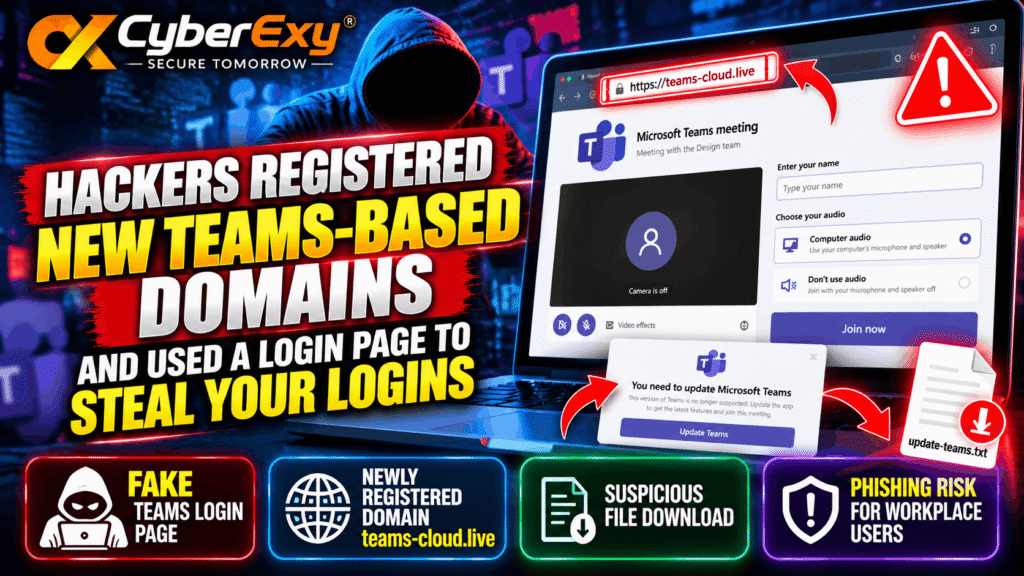
Cybersecurity researchers are warning about a suspicious website, teams-cloud[.]live, that reportedly imitates Microsoft Teams’ meeting interface. The domain was reported by security researcher Steven Lim on October 18, 2026, when it was approximately five days old.
The discovery highlights a persistent cybersecurity risk: attackers can copy familiar workplace applications to make fraudulent websites appear legitimate. Employees who trust the appearance of a page without checking its web address may expose themselves or their organizations to phishing attempts.
According to the report, the website displays a Teams-style meeting page and prompts visitors to update Microsoft Teams. Lim stated that selecting the update option downloaded a TXT file. However, the available information does not establish whether credentials were successfully stolen, whether the downloaded file was malicious, or how many users encountered the website.
How the Fake Microsoft Teams Website Works
The reported website imitates elements of the Microsoft Teams interface, including a meeting screen and options related to joining a meeting. This design may make the page appear familiar to employees who regularly use collaboration tools.
The central warning sign is the domain name. The address teams-cloud[.]live is not, simply by its appearance, proof of a legitimate Microsoft service. Attackers can register domains containing recognizable product names and use copied interfaces to make fraudulent pages look convincing.
A familiar logo, meeting layout, or update message should never be treated as proof that a website is authentic.
Suspicious Teams Update Download
The researcher reported that clicking an update option resulted in a TXT file download. The alert did not provide the file’s contents, cryptographic hash, or evidence that it executed code.
Consequently, the download should be treated as suspicious rather than described as confirmed malware. Security teams investigating the incident should preserve the file for analysis and review relevant browser, endpoint, and network records.
Organizations should also avoid opening the downloaded file unnecessarily and follow their established incident-response procedures.
Healthcare-Themed Subdomain Raises Additional Concerns
The researcher also identified amgen[.]teams-cloud[.]live, a subdomain containing the name of a healthcare company. A subdomain can be created beneath a domain controlled by its owner, allowing the operator to make a deceptive address appear connected to a recognizable organization.
However, the reported address alone does not establish that the company was breached, that its employees were targeted successfully, or that an account was compromised. These possibilities require independent investigation.
The appearance of organization-specific names in suspicious URLs is nevertheless a useful indicator for security teams conducting threat hunting and domain monitoring.
Why Teams-Themed Phishing Is a Concern
Workplace collaboration tools are closely integrated into daily business operations. Employees use them for meetings, file sharing, internal communications, and contact with colleagues or support staff.
Attackers may exploit this familiarity through:
- Fake login pages: Pages designed to persuade users to enter their account credentials.
- Fraudulent update prompts: Messages encouraging visitors to download unexpected files.
- Impersonation: Interfaces or messages designed to appear associated with a trusted organization.
- Deceptive domains: Web addresses that incorporate familiar product names without belonging to the legitimate provider.
These techniques do not necessarily exploit a vulnerability in Microsoft Teams itself. A phishing website can operate independently of the legitimate application by manipulating users’ trust in familiar branding.
How Organizations Can Protect Their Employees
Security teams should respond proportionately to the reported indicators while avoiding unsupported assumptions about the incident’s impact.
1. Block the Reported Domains
Administrators should assess and, where appropriate, block teams-cloud[.]live and amgen[.]teams-cloud[.]live through organizational DNS filtering, secure web gateways, endpoint controls, or other relevant security systems.
Microsoft Defender administrators can review available URL and domain-blocking capabilities and confirm that the selected controls apply to their environment. Blocking should be validated rather than assumed to cover every access route.
2. Review Network and Browser Activity
Investigate whether managed devices connected to the reported domains. Relevant records may include DNS queries, web proxy logs, endpoint telemetry, browser download history, and security alerts.
If the domains appear in organizational activity, establish which devices and accounts were involved and whether any suspicious files were downloaded.
3. Investigate Downloaded Files Safely
Security teams should preserve relevant files and metadata, calculate cryptographic hashes, and analyze suspicious downloads using approved defensive tools and procedures.
Do not label a file malicious solely because it was downloaded from a suspicious website. Findings should be based on file analysis and supporting evidence.
4. Review Account Activity
If an employee entered credentials on the reported website, follow the organization’s account-compromise response process. This may include resetting affected credentials, revoking active sessions, reviewing sign-in logs, and checking multifactor authentication activity.
If no credential submission occurred, do not assume an account has been compromised. Base further action on the available evidence.
5. Train Employees to Verify Meeting Links
Employees should check the full website address before entering credentials or downloading software. Unexpected update prompts should be verified through the organization’s established IT support channel.
Official software updates should be obtained through approved distribution methods, such as company-managed software deployment or verified vendor channels.
What Security Teams Should Know
The report concerning teams-cloud[.]live demonstrates why organizations should monitor suspicious domains and investigate unexpected downloads. However, the available evidence does not confirm successful credential theft, malware execution, or a breach of the named healthcare company.
The distinction matters: accurate incident reporting helps organizations prioritize their response without exaggerating what is known.
Security teams should use the reported domains as investigation leads, review relevant telemetry, and apply appropriate protective controls. Employees should remain cautious of unexpected meeting links and update prompts, even when a page closely resembles familiar workplace software.
Conclusion
The reported fake Microsoft Teams website is a reminder that convincing interfaces do not guarantee legitimate services. Newly registered domains, deceptive meeting pages, and unexpected downloads deserve careful investigation, especially in business environments where collaboration tools are used every day.
Organizations can reduce exposure by blocking confirmed malicious indicators where appropriate, monitoring network activity, reviewing suspicious downloads, and teaching employees to verify URLs before entering credentials.
CyberExy — Secure Tomorrow.
Sources
- Steven Lim’s reported security alert: https://www.linkedin.com/posts/0x534c_threathunting-share-7517467940300951552-ksYc/
- Microsoft Teams-related phishing coverage: https://cybersecuritynews.com/hackers-impersonate-it-help-desk-on-teams/
- Microsoft security documentation on blocking URLs and domains: https://learn.microsoft.com/en-us/defender-office-365/tenant-allow-block-list-urls-configure