TCM Security Windows Privilege Escalation: Beginner Guide

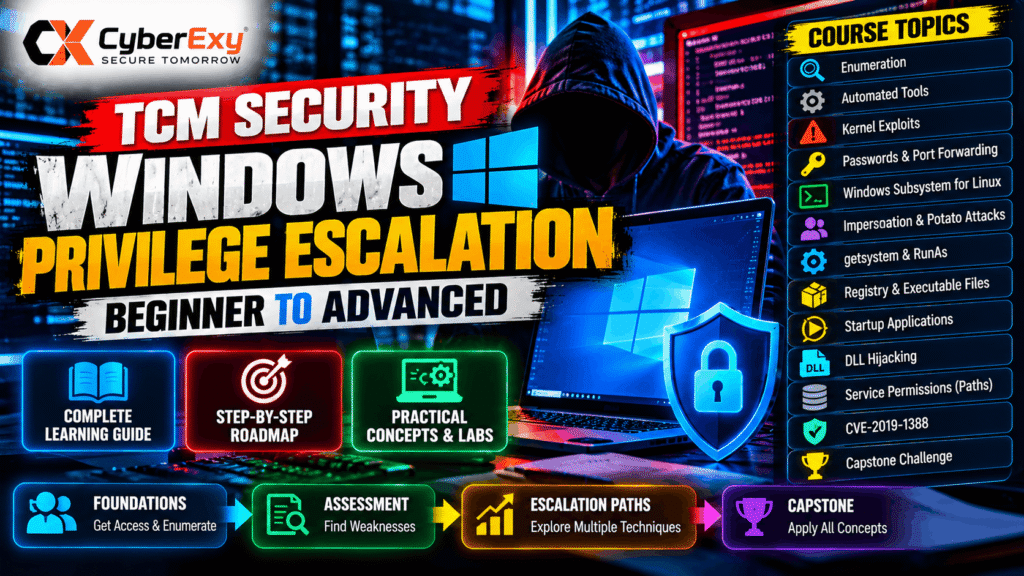
TCM Security Windows Privilege Escalation: A Beginner-to-Advanced Learning Guide
Windows privilege escalation is an important topic in ethical hacking, penetration testing, and Windows system security. It focuses on understanding how a user with limited permissions might gain access to privileges they should not have, often because of insecure configurations, excessive permissions, weak access controls, or software vulnerabilities.
TCM Security’s Windows Privilege Escalation for Beginners training provides a structured way to study these concepts through practical security learning. The curriculum shown in the available course outline progresses from introductory material and initial enumeration to Windows-specific escalation concepts and a capstone challenge.
For aspiring penetration testers, security analysts, and system administrators, learning these techniques can help identify security weaknesses before attackers exploit them. The same knowledge also supports better Windows hardening, vulnerability management, and incident investigation.
In this guide, CyberExy explores the major topics in the course outline, explains why they matter, and highlights how to approach Windows privilege escalation responsibly in authorized lab environments.
What Is Windows Privilege Escalation?
Windows privilege escalation occurs when a user or process gains permissions beyond those originally assigned to it.
Windows uses access controls, user accounts, groups, privileges, and security policies to determine what a process can access or change. These controls help prevent ordinary users from performing administrative operations without authorization.
However, weaknesses in configuration or software can undermine these protections.
Two broad categories are important:
- Vertical privilege escalation: A user or process obtains a higher level of privilege, such as moving from a standard user context to an administrator-level context.
- Horizontal privilege escalation: A user obtains access to another account or resource at a similar privilege level without proper authorization.
Windows privilege escalation is particularly important in enterprise environments because a compromised low-privilege account can sometimes become a starting point for a more serious security incident.
The objective of an authorized penetration test is to identify and document these weaknesses, demonstrate their impact within the approved scope, and recommend effective remediation.
Why Learn Windows Privilege Escalation?
Windows systems are widely used in business environments, educational institutions, and enterprise networks. Security professionals therefore need to understand how Windows permissions and configurations affect system security.
Learning privilege escalation helps professionals develop several practical skills.
Understanding Windows security architecture: Learn how users, groups, permissions, services, and administrative privileges interact.
Identifying configuration weaknesses: Recognize insecure permissions, unnecessary privileges, unsafe application settings, and other potential escalation risks.
Improving penetration-testing methodology: Follow a structured process that begins with observation and evidence collection rather than immediately attempting exploitation.
Supporting defensive security: Translate assessment findings into concrete improvements, such as restricting permissions, correcting service configurations, and applying security updates.
Preparing for advanced security work: Build foundational knowledge relevant to internal penetration testing, vulnerability assessment, Windows administration, and security operations.
TCM Security Windows Privilege Escalation Course Overview
The module names visible in the supplied course screenshots indicate a progression from introductory concepts to more specialized Windows privilege-escalation topics.
The listed sections include:
- Introduction
- Gaining a Foothold
- Initial Enumeration
- Exploring Automated Tools
- Escalation Paths — Kernel Exploits
- Escalation Paths — Passwords and Port Forwarding
- Escalation Paths — Windows Subsystem for Linux
- Impersonation and Potato Attacks
- Escalation Paths —
getsystem - Escalation Paths — RunAs
- Additional Labs
- Escalation Paths — Registry
- Escalation Paths — Executable Files
- Escalation Paths — Startup Applications
- Escalation Paths — DLL Hijacking
- Escalation Paths — Service Permissions and Paths
- Escalation Paths — CVE-2019-1388
- Capstone Challenge
- Conclusion
This outline demonstrates that the training covers multiple categories of potential Windows security weaknesses. The exact practical exercises, demonstrations, and learning outcomes should be checked against the course materials themselves.
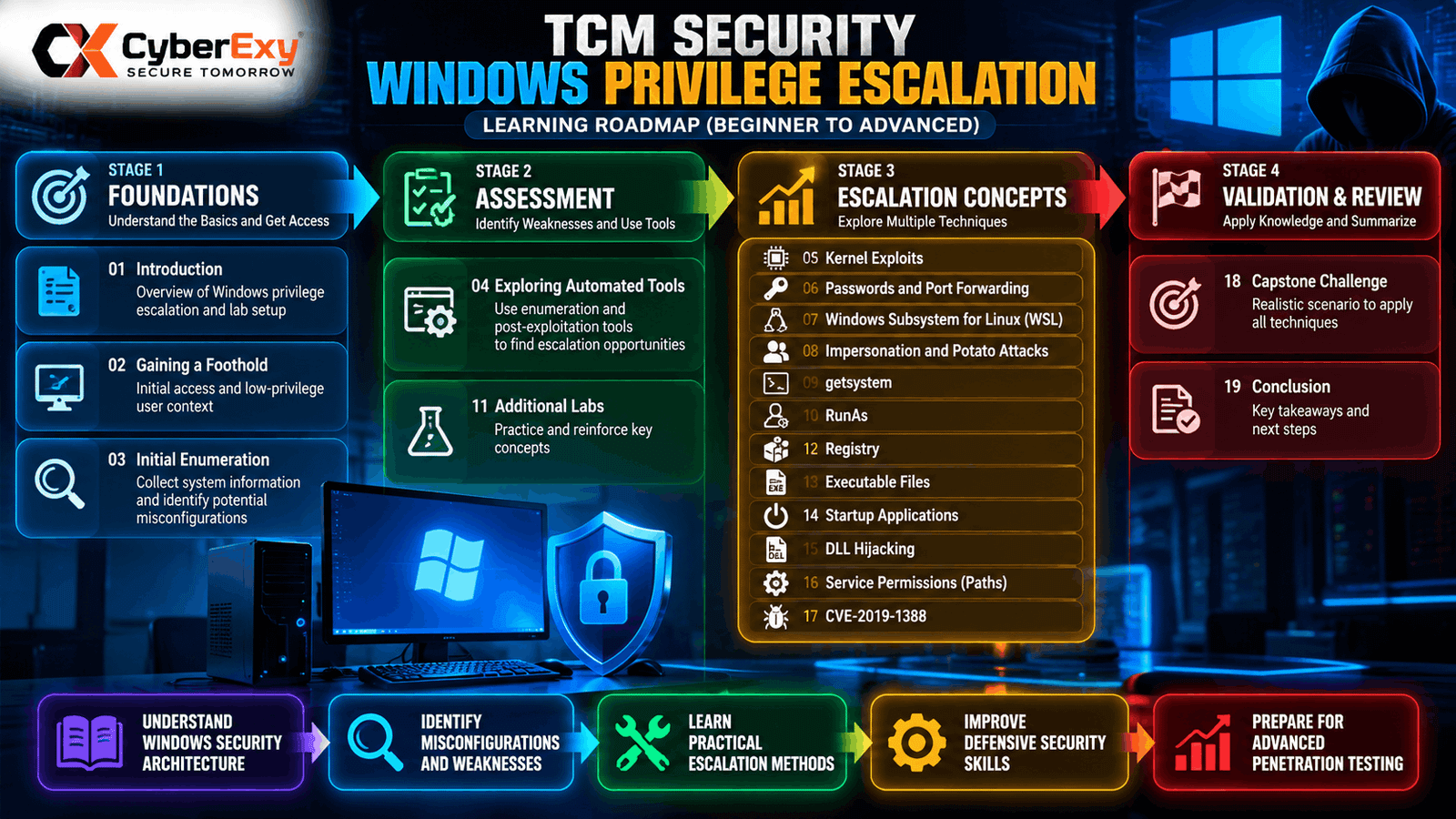
Figure : Windows privilege-escalation learning roadmap, from initial enumeration and security assessment to common misconfiguration categories and the capstone challenge. Source: CyberExy, based on the supplied TCM Security course outline.
This figure should visually organize the curriculum into four broad learning stages:
- Stage 1 — Foundations: Introduction, gaining a foothold, and initial enumeration.
- Stage 2 — Assessment: Automated tools and identifying potential weaknesses.
- Stage 3 — Escalation concepts: Kernel vulnerabilities, credentials and permissions, WSL, impersonation, RunAs, registry settings, executable files, startup applications, DLL hijacking, and service configurations.
- Stage 4 — Validation and review: Additional labs, the capstone challenge, and the conclusion.
The roadmap is a high-level editorial grouping of the visible module titles, not an official TCM Security diagram.
1. Foundations: Gaining a Foothold and Initial Enumeration
A structured security assessment begins with understanding the environment. Before evaluating a potential privilege-escalation issue, a tester needs to know which account is in use, what access is available, and what security boundaries apply.
Initial enumeration is the process of collecting relevant information about a system and its configuration. In an authorized lab, this helps establish a baseline for understanding the machine’s security posture.
From a defensive perspective, enumeration can reveal questions such as:
- Are users assigned more privileges than their roles require?
- Are administrative accounts adequately protected?
- Are security policies configured appropriately?
- Are important applications and services maintained?
- Are permissions consistent with organizational requirements?
The key lesson is that findings must be interpreted in context. A particular account, service, or configuration is not automatically vulnerable simply because it exists.
A useful assessment documents the observation, explains why it matters, establishes whether the condition creates a real security risk, and recommends a suitable correction.
2. Exploring Automated Enumeration Tools
Automated tools can help security professionals collect system information and identify potentially risky configurations more efficiently.
However, automated findings require validation. A tool may report a suspicious permission or configuration without proving that it can be used to obtain additional privileges.
A disciplined assessment should distinguish between:
- Observation: What the tool actually detected.
- Potential weakness: Why the finding may affect security.
- Validation: Whether the weakness is relevant and reproducible within the authorized test scope.
- Impact: What an attacker could realistically achieve if the issue were abused.
- Remediation: How the organization can eliminate or reduce the risk.
For defenders, the same principles apply when reviewing vulnerability scanners, endpoint alerts, and configuration-audit results.
Automated tools are valuable when they support evidence-based analysis rather than replace it.
3. Windows Kernel Exploits and Software Vulnerabilities
The course outline includes a section on kernel exploits. The Windows kernel is a central component of the operating system, responsible for core functions such as process management, memory management, and interactions with hardware.
A vulnerability affecting a privileged operating-system component can have serious consequences. Depending on the flaw and its conditions, exploitation may allow an attacker to cross a security boundary or affect system stability.
Nevertheless, the presence of an outdated component does not automatically prove that a machine is exploitable. Assessment requires checking the relevant software version, security updates, system configuration, and vulnerability prerequisites.
Organizations should prioritize security updates, monitor vendor advisories, and maintain an accurate inventory of operating systems and installed software.
Testing potentially vulnerable components should take place only in a controlled environment, because poorly chosen tests can cause crashes or disrupt services.
4. Credentials, RunAs, and Windows Security Contexts
Credentials and process security contexts are important parts of Windows privilege management.
The curriculum includes topics relating to passwords, port forwarding, and RunAs. At a conceptual level, these areas highlight the relationship between account security, authentication, process execution, and access to other resources.
Poor credential management can increase risk when passwords are reused, stored insecurely, exposed in logs, or assigned to accounts with excessive privileges.
Similarly, running an application under another account changes its security context and can affect what the application is permitted to access.
Organizations should apply strong authentication controls, protect credentials, restrict administrative account use, and audit unusual authentication activity.
Port forwarding is a networking concept that can affect how services are reached. Its security implications depend on the network design and the access controls around the forwarded service. Unnecessary forwarding rules should be reviewed and removed.
5. Windows Subsystem for Linux and Impersonation Concepts
The module list includes Windows Subsystem for Linux (WSL) and impersonation-related topics, including so-called Potato attacks.
WSL allows supported Linux environments to operate within Windows. Its security depends partly on how Windows accounts, file permissions, application access, and host-system controls are configured.
Organizations using WSL should define approved use cases, keep relevant components updated, and ensure that access to sensitive files and administrative resources remains appropriately restricted.
Impersonation, meanwhile, relates to a process or security component acting under another identity or security context. Windows uses identity and token mechanisms to enforce access decisions. Weaknesses in how privileged contexts are exposed or managed can create security risks.
For defenders, the priority is to understand which accounts and processes hold sensitive privileges, restrict unnecessary rights, and investigate unexpected privilege changes.
The appearance of a technique in a training curriculum does not mean that every Windows system is susceptible to it. Applicability depends on the operating-system version, configuration, permissions, and other prerequisites.
6. Registry, Executable Files, Startup Applications, and DLL Hijacking
Several modules in the supplied outline concern configuration and application-loading behavior.
These topics matter because Windows applications rely on system settings, executable files, libraries, and startup mechanisms. If these components are configured insecurely, a process may load an unintended file or execute code with more privileges than expected.
Registry security
The Windows Registry stores configuration information for the operating system and applications. Registry permissions should prevent unauthorized users from modifying security-sensitive settings.
Administrators should review access controls on important keys, monitor unexpected changes, and ensure that only authorized identities can alter privileged application configurations.
Executable-file permissions
Applications and supporting files should have permissions appropriate to their purpose. If an unprivileged user can modify a file that a privileged process later executes, the configuration may create a serious risk.
Defenders should verify file ownership, write permissions, installation paths, and the identity under which the relevant process runs.
Startup applications
Startup mechanisms allow applications and components to run when a user signs in or when the system starts. Unexpected or improperly controlled startup entries may create persistence or execution risks.
Organizations should maintain visibility into approved startup applications, monitor unusual changes, and restrict write access to security-sensitive locations.
DLL hijacking
Dynamic-link libraries (DLLs) provide reusable functionality to Windows applications. DLL hijacking generally refers to situations in which an application loads an unintended or malicious library because of insecure library-loading behavior or related configuration weaknesses.
Defensive measures include using secure library-loading practices, controlling writable application directories, validating software installations, and monitoring suspicious file changes.
These issues illustrate a recurring security principle: permissions should reflect the minimum access necessary for a user or process to perform its legitimate function.
7. Windows Services, Service Permissions, and Paths
Windows services often operate in the background and may run under accounts with significant privileges. As a result, service configuration is an important part of Windows security assessment.
Potential weaknesses can involve excessive permissions, unsafe executable paths, inappropriate service-account privileges, or insecure access to service-related files and settings.
A finding should be assessed by examining the actual permissions, service configuration, execution context, and practical impact. A nonstandard configuration is not necessarily exploitable.
Administrators can reduce risk by:
- Assigning service accounts only the privileges they require.
- Restricting modification of service executables and related directories.
- Reviewing permissions on service configuration settings.
- Applying relevant software and operating-system updates.
- Monitoring unexpected changes to services and their associated files.
These controls help prevent an ordinary user from modifying components that are later trusted by a more privileged process.
8. CVE-2019-1388 and Vulnerability Research
The supplied curriculum lists CVE-2019-1388 as a dedicated topic. A CVE identifier refers to a publicly documented vulnerability, but the presence of a vulnerability in a training module does not establish that a particular computer remains affected.
A responsible assessment should identify the affected component, check the vendor’s security documentation, determine whether applicable updates are installed, and establish whether the system meets the vulnerability’s conditions.
Organizations should avoid relying solely on an operating-system version label or a scanner’s unverified result. Asset inventory, patch status, configuration details, and reliable vendor guidance all contribute to an accurate assessment.
The broader lesson is that vulnerability research must connect technical findings to a real system and a demonstrable security impact.
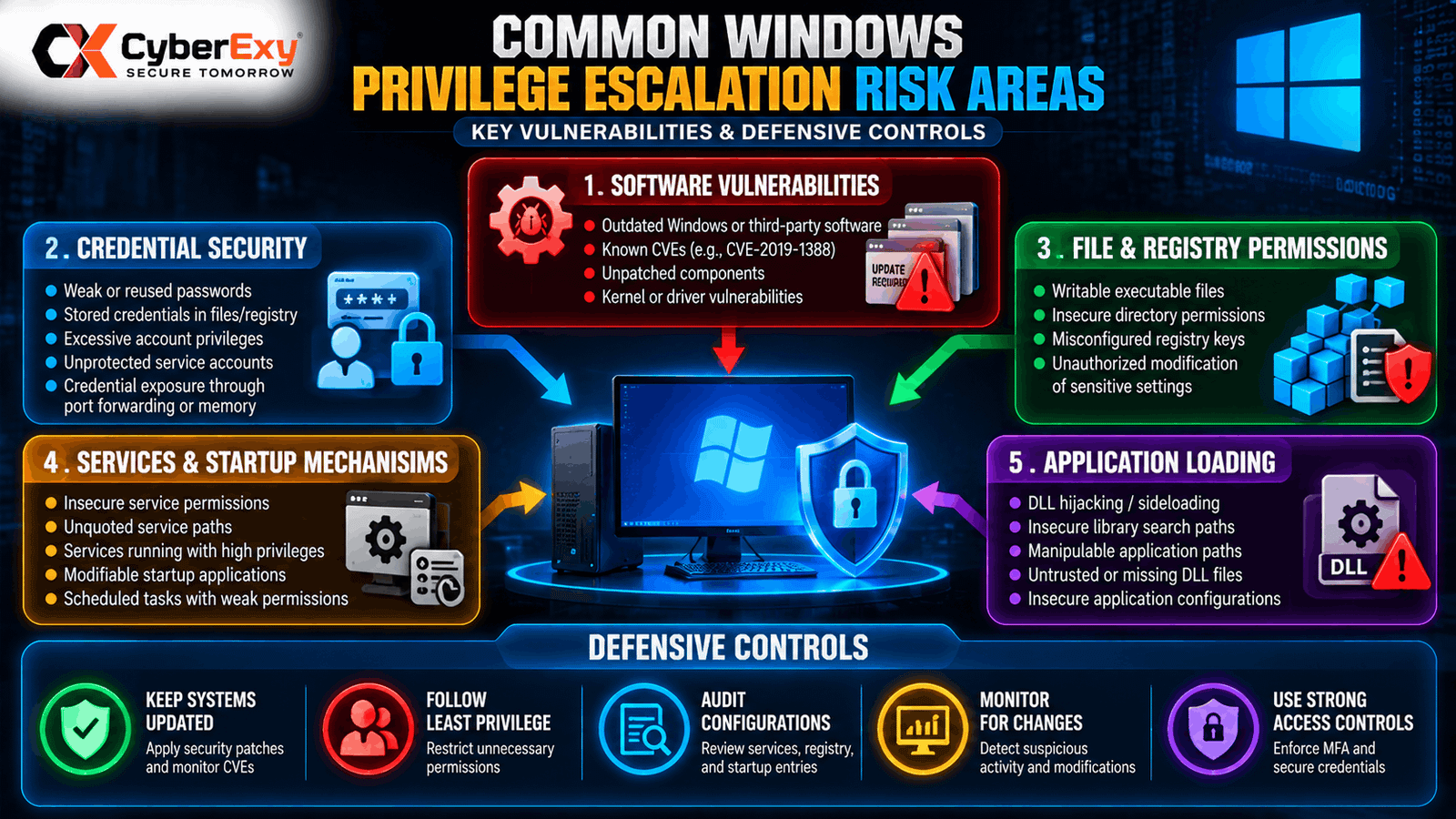
Figure : Common Windows privilege-escalation risk areas, including excessive permissions, insecure service configurations, vulnerable software, credential exposure, and unsafe application-loading behavior. Source: CyberExy, based on the topics listed in the supplied course outline.
The graphic should use a central Windows workstation icon surrounded by five labeled categories:
- Software vulnerabilities — outdated or vulnerable components.
- Credential security — weak protection or excessive account privileges.
- File and registry permissions — unauthorized modification of sensitive settings.
- Services and startup mechanisms — insecure execution contexts and writable paths.
- Application loading — unsafe library-loading or executable-file configurations.
Include a small defensive-control strip showing patch management, least privilege, configuration auditing, and monitoring.
This should be an original educational infographic, not a screenshot of an exploitation sequence or a diagram claiming to represent TCM Security’s official material.
9. The Capstone Challenge: Connecting the Concepts
The final major section visible in the course outline is a capstone challenge. Capstone exercises help learners connect separate concepts and apply a consistent assessment methodology.
A useful learning process involves understanding the authorized scope, collecting relevant information, documenting potential weaknesses, validating findings safely, and communicating recommendations.
For each finding, a professional report should include:
- Finding: A concise description of the observed weakness.
- Evidence: Relevant configuration details, logs, or lab observations.
- Security impact: The realistic consequence if the issue is abused.
- Severity: A reasoned assessment based on likelihood and impact.
- Remediation: A practical recommendation to reduce the risk.
- Retesting: Evidence that the corrective action has addressed the problem.
This reporting process is valuable beyond penetration testing. System administrators, vulnerability-management teams, and security operations professionals can use similar methods to prioritize and resolve configuration risks.
Best Practices for Learning Windows Privilege Escalation Safely
Anyone studying these concepts should use systems they own or have explicit permission to test.
A safe learning environment should be isolated from production systems, use non-sensitive test data, and provide a reliable way to restore the system after experiments.
The following practices support responsible learning:
Use authorized labs. Do not test privilege-escalation techniques against systems without permission.
Understand the underlying security control. Learn why a configuration is unsafe instead of memorizing a sequence of commands.
Validate findings carefully. Distinguish an automated warning from a confirmed vulnerability.
Prioritize remediation. Understand how updates, permissions, service-account restrictions, and configuration changes reduce exposure.
Document results. Maintain clear records of observations, limitations, impact, and corrective actions.
Respect the scope of an assessment. Stop when testing reaches the limits of the authorized environment.
Is TCM Security’s Windows Privilege Escalation Course Still Available?
TCM Security published a course-retirement announcement in April 2025 stating that Windows and Linux Privilege Escalation for Beginners would no longer be included in its All-Access Membership starting May 7, 2025. The announcement also stated that the courses would remain available through the PNPT voucher package, which included 12 months of course access.
Because course access and packages can change, readers should verify current availability through TCM Security’s official course-retirement announcement and TCM Security Academy.
The module outline discussed in this article is based on the course-folder names visible in the supplied screenshots. It should not be interpreted as confirmation that the course is currently included in a particular membership or that every module is still delivered in the same format.

Conclusion
Windows privilege escalation is a valuable area of cybersecurity because it connects operating-system internals, identity management, software vulnerabilities, and practical access control.
The TCM Security course outline progresses from introductory concepts and enumeration to kernel vulnerabilities, credentials, WSL, impersonation, registry settings, executable files, startup applications, DLL hijacking, service permissions, and a capstone challenge.
For beginners, the best approach is to learn the security principles behind each topic and practise in an authorized lab. For experienced practitioners, the same concepts can support more rigorous configuration reviews, vulnerability assessments, and remediation planning.
Ultimately, effective Windows security depends on understanding how permissions and execution contexts interact, verifying suspected weaknesses with evidence, and correcting the underlying conditions rather than simply identifying a potential attack path.
Follow CyberExy for more cybersecurity tutorials, ethical hacking education, vulnerability analysis, and practical defensive security guidance.
References
- TCM Security. Course Retirements: Windows & Linux Privilege Escalation for Beginners. Available at: https://tcm-sec.com/course-retirement-privilege-escalation/
- TCM Security. Academy: Cybersecurity Training Courses. Available at: https://tcm-sec.com/academy/
- TCM Security Academy. Windows Privilege Escalation for Beginners — Course Introduction. Available at: https://tcm-sec-academy.teachable.com/courses/windows-privilege-escalation-for-beginners/lectures/24794928
Editorial note: Course details in this article are based on the visible folder titles and the linked public references. Check the original course materials before attributing a specific demonstration or technical finding to the instructor.