Gheist Attack Steals GitHub Secrets Through Malicious Actions Workflows

Gheist Campaign Steals GitHub Repository Secrets Using Stolen Tokens and Malicious Actions Workflows
Introduction
A cyberattack campaign named Gheist is abusing stolen GitHub authentication tokens to access private repositories and extract sensitive credentials through malicious GitHub Actions workflows. According to cloud security company Wiz, the campaign has affected more than 850 compromised accounts and involved over 13,500 malicious branches.
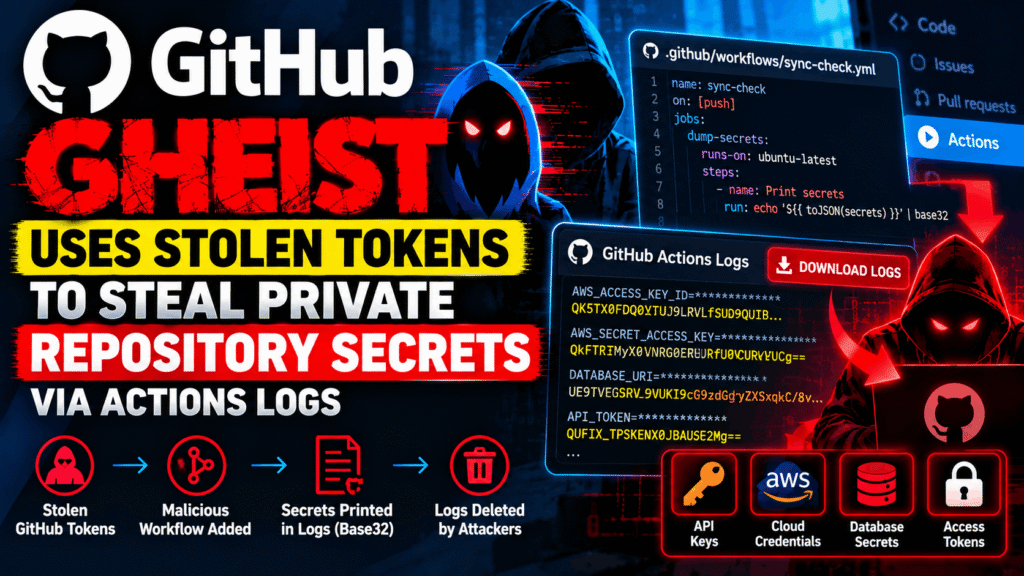
The attackers create workflows designed to expose repository secrets in GitHub Actions logs, download the resulting output, and delete the workflow runs shortly afterward. This approach can make the activity harder to identify during routine investigations.
Wiz has tracked the campaign since September 15, 2026, and reported that it remained active as of October 24. The findings highlight significant risks for organizations that depend on GitHub Actions, cloud integrations, and automated software delivery pipelines.
Source: Wiz — Gheist: Attempted Scaled Abuse of Stolen GitHub Tokens
How the Gheist GitHub Attack Works
The campaign begins with stolen GitHub tokens obtained from sources that include infostealer logs and previous software supply-chain compromises. A token with sufficient repository write permissions can allow an attacker to modify workflows and access secrets available to those workflows.
Wiz observed the attackers creating branches named ci-sync- followed by six random characters. They then add a workflow file at:
.github/workflows/sync-check.yml
The workflow is designed to expose secrets available to its execution environment. The resulting output is encoded using Base32 before appearing in the logs.
GitHub Actions attempts to mask sensitive values in logs, but that protection is not guaranteed when a secret is transformed or encoded. The attackers exploit this limitation by retrieving the encoded output through GitHub’s API.
After downloading the logs, the campaign deletes the workflow runs, potentially reducing the visibility of the original activity.
Importantly, the attackers do not necessarily need an external server to receive the stolen data. Because the output is retrieved through GitHub itself, conventional monitoring focused exclusively on outbound connections may not detect the complete sequence.
Private Repositories and Enterprise Environments Are at Risk
Wiz reported that its investigation identified malicious branches across personal accounts and enterprise environments, including private repositories and GitHub Enterprise Server deployments.
The campaign’s impact depends on the permissions available to the compromised token and the secrets accessible to the affected workflow. These may include repository credentials, deployment keys, cloud authentication material, and production environment secrets.
In enterprise environments, Wiz observed tokens associated with multiple users and automation accounts being used within short periods. The attackers also cloned private repositories before introducing malicious workflows.
Cloud audit records showed AWS role-assumption activity associated with the affected organizations. Wiz additionally reported subsequent AWS Secrets Manager enumeration, although its published analysis did not establish exactly where the relevant credentials originated or who used them.
These findings illustrate how a compromised source-code account can become a route into connected cloud infrastructure.
Why GitHub’s Workflow Protection Did Not Stop Every Attack
GitHub introduced a safeguard on July 28, 2026, that holds certain potentially malicious workflow runs in public repositories on GitHub.com until an authorized collaborator approves them.
According to Wiz, every public-repository Gheist run it examined remained held for approval, preventing the malicious workflow from executing in those cases.
However, the safeguard’s documented scope did not cover private repositories or GitHub Enterprise Server in the same way. Consequently, organizations should not assume that suspicious workflow execution will always be blocked automatically.
Wiz also distinguishes Gheist from GhostAction, another campaign involving malicious GitHub Actions workflows. Similar attack techniques do not establish that the campaigns share the same operators or infrastructure.
Related reporting: GitHub Actions Supply-Chain Attacks and the GhostAction Campaign.
Gheist Campaign: Indicators of Compromise
Security teams can use the following indicators from Wiz’s published research to investigate potentially affected repositories.
| Indicator | Value |
|---|---|
| User-agent string | gheist |
| Branch pattern | ^ci-sync-[0-9a-z]{6}$ |
| Commit message | ci: sync config |
| Workflow file | .github/workflows/sync-check.yml |
| Self-hosted runner marker | gdmp-pivot |
| Runner-related files | .gdmp_pat, .gdmp_patg, .gdmp_sweep |
Wiz also published Git blob hashes associated with observed workflow variants:
- Plain workflow:
f3da2b8b357dcda02fd455d314be2a95007516a6 - Timeout variant:
d09535857a741bbb976bdc084a9a021713133291 - Separator variant:
1dc5af9cce950aad1eb1546ecce8565b117540c4 - Self-hosted runner variant:
c665b778b2d822453293003e7ca0bbb2cb08e39d
These indicators are useful for threat hunting, but they should not be treated as a complete list of every campaign variant.
How to Detect Suspicious GitHub Actions Activity
Organizations should review repository activity, workflow execution records, and connected cloud audit logs for evidence of unauthorized changes.
Start by searching for branches matching the ci-sync- naming pattern. Inspect suspicious branches for unexpected workflow files and commits that modify only the reported synchronization workflow.
Next, review GitHub audit logs for workflow runs that finish and are deleted shortly afterward. Investigate events associated with the gheist user-agent string where that information is available.
Cloud security teams should also review AWS CloudTrail records for unexpected role assumptions or credential use linked to suspicious branches. OpenID Connect (OIDC) integrations can provide useful evidence because workflow identity information may appear in the cloud authentication records.
For self-hosted runners, investigate the reported file indicators and gdmp-pivot marker. If a suspicious workflow executed on a self-hosted machine, treat the runner and its associated cloud permissions as potentially compromised until an investigation establishes otherwise.
How to Protect GitHub Repositories from Secret Theft
Wiz recommends several defensive measures to reduce the impact of stolen GitHub tokens and malicious workflows.
1. Rotate exposed credentials
If a malicious workflow ran, identify and rotate every repository, organization, and deployment-environment secret that the workflow could access. Revoke compromised tokens and investigate the devices belonging to their owners for possible infostealer infections.
Deleting a suspicious branch or workflow run does not invalidate credentials that may already have been exposed.
2. Strengthen deployment environment protection
Require authorized reviewers before workflows can access production environment secrets. Review approval rules to ensure that unexpected workflow changes cannot bypass established deployment controls.
3. Restrict cloud OIDC permissions
Limit cloud identity trust policies to approved branches, protected environments, and the intended repository identities. Avoid granting broad cloud permissions to workflows that do not need them.
4. Replace long-lived tokens where practical
Prefer GitHub Apps and short-lived, fine-grained credentials over broadly privileged personal access tokens. Regularly review token permissions, ownership, expiration, and usage.
5. Harden self-hosted runners
Use ephemeral runner machines that are destroyed after jobs complete. Avoid unnecessary access to Docker sockets, cloud instance metadata, and sensitive host resources.
6. Improve workflow monitoring
Enable appropriate audit logging and alert on unexpected workflow changes, suspicious branch creation, unusual token use, and rapidly deleted workflow runs. Review workflows before approving suspicious runs, and never execute code from an untrusted branch simply to investigate it.
For additional guidance, consult GitHub’s documentation on securely using GitHub Actions and its OpenID Connect documentation.
Conclusion
The Gheist campaign demonstrates how stolen GitHub tokens can turn legitimate CI/CD infrastructure into a channel for credential theft. By inserting malicious workflows, retrieving encoded secrets from Actions logs, and deleting workflow runs, attackers can abuse trusted development services without necessarily relying on a separate data-exfiltration server.
Organizations should investigate suspicious ci-sync- branches, audit GitHub and cloud activity, rotate potentially exposed secrets, and strengthen controls around tokens, deployment environments, and self-hosted runners.
The key lesson is that deleting malicious workflow activity is not enough: exposed credentials must be revoked or rotated, and the original token compromise must be investigated.